Scrabble Score Calculator
scrabble calculator
Rate this tool!
Would you like to elaborate on the rating you gave?
-
1.27.12 / 19:11
Hm, that’s very strange! I’ve played a lot of WWF and never had that happen. You might ask the people who make WWF?
-
1.27.12 / 19:07
Hi Kate…I have had 2 games start as something other than 0-0. One was 8-0, one was 12-0, and I hadn’t made a move yet as first player. It was WWF, too. Maybe it was just a glitch. But since they were both in my favor, I didn’t mind.
-
1.22.12 / 15:33
Hi Karlie! The scores should always start at 0-0, as far as I know. Are you playing Words with Friends, or another Scrabble game? I have no idea why some games wouldn’t start at 0!
-
1.22.12 / 13:16
What is a base score? Why don’t some of my games start at 0-0?
-
1.12.12 / 17:20
Hi Leslie! A blank tile can be used as any letter you want, but it has no point value. So this means you just got the one point from the ‘O’. From the Words with Friends website:
“Blank tiles carry no point value but can become any letter you wish, making them useful for completing words that wouldn’t have been possible otherwise. Even blank tiles placed on a double or triple-letter square are zero.”
For more about blank tile scoring, check out Words with Friends’ scoring rules.
I hope this helps!
-
1.12.12 / 14:12
Hi there — I’m playing Words with Friends. There was an existing “O” on the board and I had a blank tile. Directly beneath the “O” was a triple letter space so I placed the blank tile there with the designation of “X” which, I’m sure you know, is 8 points. WwF gave me 1 point for the word “OX”. Can you explain why? I obviously don’t know the rule for this scenario.
-
1.8.12 / 23:02
thanks for the tool
-
1.7.12 / 5:00
VUVUZELA IS THE BEST WORD I KNOW!!!!!!!!!!!
(if in the right place!)
USE IT IF U CAN! -
12.30.11 / 8:46
Hi Richard! Thanks for the feedback! I don’t have a list of all the Scrabble words with point values. I’m not sure how useful it would be since it doesn’t take into account double/triple letter/word tiles, though I suppose it would give you a “base” point value for the word. You might also use the enable1.txt file, which is the official word list for Words with Friends. I hope this is helpful!
-
12.29.11 / 8:29
Outstanding tool! I was wondering if you happened to have a list that contains all the scrabble words and their point values that you could share? The group I play scrabble with doesnt allow anything but paper lists or books. Something like this would be very beneficial to me… Thanks!
-
12.20.11 / 7:59
Oh, good! A droid app is definitely something I want to develop at some point; I just need to find the time!
-
12.19.11 / 21:01
Kate, that was exactly the change I was talking about. This calculator is perfect! Now a droid app would add the icing on this delicious cake. Thank you for your time and effort.
-
12.18.11 / 8:49
Ah! I think I see what you mean. I’ve made a change to the calculator, so check it out and let me know if that’s what you meant. It’s a great idea! Thanks so much for the feedback.
-
12.17.11 / 21:07
I apologize for the general framing of the suggestion. What I meant was: along with the option to make a letter (x2) or (x3), as it is now, would it be possible to add a third option to completely make the letters’ score invalid, i.e. (blank). Thus, making it equal zero for blank tiles in play. Validating a word requires all letters to be typed in. At present, validating a word with a space in it, for example SP CE (score=8) is not possible when trying to incorporate a blank tile for a score. What I’m suggesting is, since the letter A is a blank tile in play and after typing the word SPACE, we mark under the letter A as (blank), the score would still show 8. As it stands now, validating the word SPACE shows a score of 9, but that is not reflecting what is on the board. By having the option to blank a letter, the word could still be validated because the whole word is spelled out and the score would reflect a blank tile that is in play. I hope that made sense and the confusion is somewhat clarified.
-
12.17.11 / 17:04
Hi Roman! I’m so glad you find the calculator useful. I’m not sure I understand what you mean about the “blank” option. Is it so that you can validate the word in the dictionary? It might be possible to validate multiple words at a time, if they are separated by spaces/blanks. Is that what you mean?
-
12.17.11 / 12:14
Wow! Many thanks on the brilliant effort for such a wonderful tool. Alas, I am well aware of the space bar insertion for blanks, which is great, but if I may suggest that an extra button along with the x2 and x3 could be added as a “blank” option. Reason being, you could still look up the word for validation without an actual space in the spelling, which the dictionaries seem to frown upon unfortunately. Thank you for providing such an amazing aid that facilitates our family game night.
-
12.16.11 / 13:44
Hi Kimberly! You should be able to just type the word into the input box and the score will be calculated for you. You must have Javascript enabled in your browser in order for the calculator to work. Let me know if that doesn’t fix it!
-
12.16.11 / 13:39
I don’t see how you use the calculator. Is there a button I”m missing?
-
12.3.11 / 18:15
Thanks for the info, Gillian!
-
12.3.11 / 17:05
I just wanted to say to Renee, below, that WwF scoring can be full of errors. Just now I had 388 points near the end of a game, played and hit submit on a 24-point word, and then it said I had 381 pts! I was mad, but couldn’t do anything about it. However, after my opponent played his next word, my score suddenly fixed itself and it showed 412 for me lime it was supposed to. *shrug* The problem could be with my Droid X, who knows? But just wanted to say that your crazy scores could very well be application errors, not your math mistakes. Hopefully they self correct like mine did. (Mine also occasionally squashes two different games with different people together, showing words from both games on one screen, so this morning, for example, I had the word “maidsgroante” across he middle of my screen — “maids” and “ante” from one game and “groan” from another game. That self-corrected too — once I closed the game and reopened it.) Good luck!
-
11.29.11 / 10:18
Oh yes, that is fine! Go ahead.
-
11.29.11 / 8:26
Te set of letter of the kas. I found that you upload the whole set of letter (a-z)
-
11.28.11 / 9:20
Ah, I think see what you’re saying. But why would you want to validate a word in the dictionary if it has a blank in it? I still don’t know what you mean by “setting that the blank shows the O without changing the tile.” Sorry I’m not understanding!
Which pictures in particular are you interested in using for your website?
-
11.28.11 / 8:12
Sometimes we uses blank don’t we. When I’m checking T(Blank)SS on the validate button dictionary, it doesn’t show result since the dictionary shows
T_SS is not a valid word.
Can we setting that the blank shows the O without changing the tile.I hope it helps.
DEO
(PS: Can I use your picture (The KAS ones) for my website, its very great!)
-
11.27.11 / 8:47
Hi Deo, I’m sorry, but I don’t understand the question! Can you clarify?
-
11.26.11 / 6:36
Hi. It’s me, Deo again. And again, blank title trouble again. How do you edit those blank
(Example:T(BLANK)SS) so I can check it without changing the balnk
(Example: I can check the word T(BLANK)SS with the blank had been setting with O , so I can do this without making as a regular TOSS) I wish you get it. Thanks
Deo -
11.25.11 / 8:23
Hi Roger! I think it would be (24 x 3 x 3) + 50 = 266. I’m not sure how you got 26 for the base score for QUACKING; it shouldn’t matter where you cross the word (A, I, or N) because you get the points for the letters you cross as well. Does that make sense?
-
11.24.11 / 20:16
If I enter the word quacking by crossing any of a or i or n; and I use all 7 letters — which can then cross two triple word scores — is my score 26 times 9 plus 50? Thanks
-
11.7.11 / 8:04
Hi Renee! You can get double-double or double-triple word scores if you make two words, one horizontal and one vertical, and the double word or triple word tile is on the corner where those two words meet. Does that make sense?
-
11.6.11 / 23:20
I don’t understand words for friends scoring. I get the dw tw dl tl but I have played a few words like “xi” for example. It was dw so it should have been 18pnts 8 for the x and 1 for the I and ya double it. But guess what. I got like 50pnts. Once I did the word jello where there was tw and I somehow got 108pnts from it. So how do I figure out which words do that? Very confusing its happened a lot to me.
-
11.6.11 / 8:44
Henry, I have added an ENABLE word check to the calculator. I hope this helps! Let me know if you have any problems using it.
-
11.5.11 / 7:57
Thank you, Henry! This is a great idea. I’ll implement an ENABLE word check as soon as I have the chance.
-
11.5.11 / 6:10
Your dictionary uses Dictionary.com and Merriam-Webster’s online dictionary BUT Words with friends uses the ENABLE wordlist (available as a free download) Note* WWF does take out certain words that they say are offensive like NAZI.
So surely you should use the ENABLE wordlist for WWF as those 2 on-line dictionaries will give many false results.
-
10.24.11 / 7:07
[...] check if it’s a real word – but I suspect it isn’t. And even if it was, in Scrabble it would only get you a weedy 9 points. To continue the poetry theme, the only rhymes are [...]
-
9.29.11 / 20:14
Hi Sandi! I’m not sure I understand your question. Is this a question about the calculator, or about Words with Friends and Scrabble games themselves?
-
9.29.11 / 10:16
why doesn’t words with friends show you how many points a word will be when you place them? like scrabble?
-
9.24.11 / 4:58
[...] Couric has already started taunting her opponents. “#WOTD for my future @WordsWFriends mates: Roil, v. To make turbid by stirring up the sediment or dregs of”. What she’s apparently unaware of is that “roil” generates a score of just five points in “Words with Friends,” according to this calculator. [...]
-
9.13.11 / 9:26
Yes it helps. Thanks a bunch. Have a nice day
-
9.13.11 / 8:01
Hi Deo! To add a blank square, just type the space bar. It counts for nothing, but it will show up in the results as a blank tile. I hope that helps!
-
9.13.11 / 3:24
Hey Kate. Have you ever add blank square feautre? Thanks
-
9.6.11 / 16:25
[...] But do feel free to explore the possibilities. [...]
-
9.3.11 / 8:14
Thanks, Anna!
-
9.2.11 / 22:21
Don’t make the tiles look to much like the official Scrabble tiles or they may get on your cast about it.
My site , http://scrabblecheat.com is all text based, no pictures. I never thought of the calculator look. Such a well done one, wow.
If you ever want to sell it let me know. -
8.31.11 / 9:48
I don’t play online; really just Words with Friends at this point.
-
8.30.11 / 18:59
Hi Kate….ooops-I just now saw your response below….somehow it never came into my inbox…sorry about that! Thanks for the kind words….do you play online? If so, lemme know! I’ll look for a response in my inbox-if it doesn’t come in, I’ll let you know just in case there’s an issue technically…..take care!
-
8.18.11 / 10:26
Hi Bob! Thanks! Your website is a lot of fun; nice work. It’s great to see fellow word game lovers out there
-
8.17.11 / 23:13
Hey Kate-
Howzit going? I enjoy your site and posts!…I’m a long-time Scrabbler, and I just launched a new website for teaching how to play all word games-it’s called http://www.scrabbleguy.com and I use short fun and easy to understand videos-a lot of fun! I’d love to get your feedback! Please lemme know what you think! Thanks -take care…Bob
-
8.14.11 / 14:02
Hi Linda,
I’m not sure what you mean by “percentage of total tiles.” Could you explain? Thanks for the feedback!
-
8.14.11 / 12:21
Can you add a percentage of total tiles used?
-
8.10.11 / 16:38
Jen,
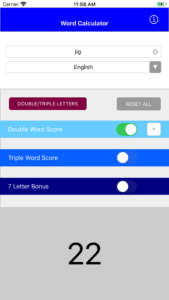
I have added your suggestion to the calculator. Now when you enter a word, a button appears that says “add to cache.” Click this to add it to a cache of saved words; you can add as many words as you like to this cache, and it will calculate the running total. Click the ‘x’ to remove a word from the cache, and again, your total will be updated.
I hope this works the way you want it to. I welcome your feedback!
-
8.10.11 / 14:38
[...] last round started at 9 this morning as the climax — hey, 17 points, is that good? — to the five-day [...]
-
8.7.11 / 14:02
This is a great suggestion! Who wants to do the math? I will try to figure out a way to add this functionality to the calculator. Stay tuned! Thanks for the feedback!
-
8.7.11 / 13:56
This is great! Didn’t see this mentioned, but a way to separate out the DW and TW when you are playing parallel or adding on on the other direction? Example:
Have Vertical: FEEL
Add Horizonal: STAND by placing the S at the end of FEEL.
There is a DW under the “a” in STANDAs I understand it, the DW score applies only to STAND, but you still get regular points for FEELS.
I know that on your tool I can type in both separately and do the math. But just adding a suggestion.
-
8.5.11 / 15:36
Sandra, I have added a validator for Words With Friends to the calculator. Check it out and let me know whether or not it works! I hope this helps!
-
8.4.11 / 8:59
What a great idea! I will look into adding this functionality, and hopefully have it working soon! Thanks for the suggestion.
-
8.3.11 / 20:52
Hey this is great but it doesn’t five a definitive answer as to whether the word entered will be accept for play with Words With Friends. Any way you can add that, x-ref with the Words With Friends word list??
-
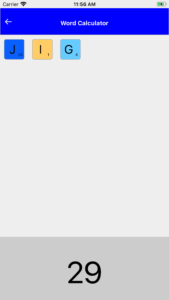
6.1.11 / 18:13
I like the way the tiles appear as you typ in the letters.
-
5.27.11 / 12:41
Wonderful! I’m so glad you are finding it useful!
-
5.27.11 / 2:33
Wow.. I love this ! Thanks sooo much for making this website it’s exactly what I needed! I’ve been searching for about 10 minutes hehehe
I use this to check my scrabble letters at school bcuz we do a thing called spelling menus, and one of them is scrabble letters, you have to make letters into numbers, just like this !
Graceful 2+1+1+3+1+4+1+1 = 14Thank you !!
-
5.9.11 / 1:04
Wonderful! I’m so glad you find it useful!
-
5.8.11 / 23:56
Thanks so much! I’ve saved the web page (complete) and it worked great.
I really appreciate the work you’ve put into this tool, it’s awesome. -
5.8.11 / 16:14
Sure, that is fine! The dictionary validation won’t work (because it requires internet access), but the rest of it is just JavaScript, so it will work without internet access. Have fun!
-
5.8.11 / 15:21
I’m not sure how useful that would be, since I’m a Windows user with no fancy phone currently XD
But thanks for the quick reply.
Would it be alright if I saved the files locally and see if that works? I definitely won’t distribute them anywhere or anything, it would just be for personal use when I don’t have net access.
-
5.8.11 / 0:29
Thanks Diane! I do have a Mac OS X widget, but it is not out for public release. Are you interested in one? This summer I also plan to build an iPhone/Droid app for the calculator.
-
5.7.11 / 22:41
This is a wonderful tool! Is there any way to use it without internet access though?
-
4.28.11 / 12:07
Thanks, Matt! If you want to get a Words with Friends score, just select “Words with Friends” from the language drop-down menu next to the word. I hope that helps!
-
4.28.11 / 9:51
Works Great!
Could you make a “words with friends” verision, pretty pleaseeee -
4.18.11 / 12:10
Thanks, Jason! I try to leave it as flexible as possible, even though it’s impossible in Scrabble to get that many double/triple word scores. Sometimes it’s fun to see how high it can go
-
4.18.11 / 5:54
Very slick, and beautifully done. The only other comment I have is that you make it possible to apply an impossible number of double and tripple word scores, no matter how long the word is.
-
4.4.11 / 12:14
Ah so there is, thanks and apologies I was working on it late last night and wasn’t firing on all cylinders
-
4.4.11 / 12:10
Hi David! You may have the “Words with Friends” language selected. Words with Friends is a Scrabble-like iPhone app that actually has different letter values than regular Scrabble. If you choose “English” from the language drop-down menu you can get the regular distributions (I also got them from the Wikipedia page). I hope this helps!
-
4.4.11 / 1:09
Hi,
I am making a scrabble game as part of a college project using java. I love the site and was using it for refining my own scoring function when I noticed that your tiles are given different values than is given on say wikipedia, eg you list L as being worth 2 whilst other sources say its worth 1: http://en.wikipedia.org/wiki/Scrabble_letter_distributionsIs there a more common score or a correct score as I would like to adopt the most appropriate system.
Thanks
-
3.26.11 / 12:54
Hi Jeff! There is no iPhone app for the calculator yet. I started working on one but it is not yet finished. Stay tuned!
-
3.25.11 / 12:35
How about having the word calc option for the iphone? Or is it there and i missed it?
-
3.15.11 / 12:34
Hi Mike! Thanks for your comment. If you switch the language to “English” then the “M” is indeed worth only 3 points. You may have had “Words with Friends” selected as the language, in which case the “M” is worth 4 points.
-
3.14.11 / 17:44
You have “M” being worth 4 points, but it is only worth 3.
-
3.4.11 / 15:37
well this is retrarded.. I dont even know what it’s supposed to do. All i need is a website to tell my how much i would score for my name on scrabble… goodness
-
1.27.11 / 0:22
Raxacoricofallapatorius isn’t worth nearly enough points. I usually get 6000 just for pronouncing it.
-
1.3.11 / 22:29
i love this
-
12.31.10 / 17:04
Hi Johny! That’s interesting–I downloaded the iPhone app, and it doesn’t actually calculate a word score. All it does is keep track of your score, but you still have to add up the letters yourself. Or was I using it wrong?
I started building an iPhone app version of my Scrabble Calculator, but I haven’t finished it yet!
-
12.27.10 / 10:25
Hi I love Scrabble
to sum points I found nice App for iPhone http://apps.isimpleness.com/addscore/, what do you think guys ? -
12.1.10 / 13:48
I love hearing this! I’m glad my calculator could help you document your son’s incredible learning!
-
12.1.10 / 3:27
My son has been using big words in our conversations for a while now. Just out of curiosity, I wondered what these big words were worth on Scrabble and stumbled onto your site (which I LOVE, BTW). He’s been using Difficult, Delicious, Delicate, Assistance, Beautiful, Vegetables, Herbs, and Curious just to name a few. My son celebrated his third birthday only two days ago.
-
10.19.10 / 12:41
You’re welcome! This is by far the best use of my calculator to date. I love hearing this!
-
10.18.10 / 23:15
Hey Kate.
Just to say a big thanks for the use of your calculator! Have been thinking of a sentance to spell out to my girlfriend that also adds up to the amount of months we’ve been together. Would have been a nightmare adding them up to get the right amount without your handy tool!
Cheers! Sim -
8.28.10 / 19:48
Thanks Allen! You could calculate a quadruple word score by applying two double word scores. Just check the double word score box, and enter 2 into the text box. That should give the correct result, unless I don’t understand your suggestion. I hope that helps! Thanks again for the feedback.
-
8.28.10 / 17:05
Say, since you’re supporting WWF on your calculator, you might want to add a Quadruple word score. There are four opportunities on that board to achieve that in less than 8 letters.
Cheers!
-
8.22.10 / 15:05
Hi Marcia!
Thanks for your feedback. This is something that I noticed a while ago, but hadn’t fixed yet. The calculator was originally written with Scrabblegrams in mind, in which you would never have both a double and a triple word score at the same time. Therefore, I made the calculator so that you could only have one or the other. However, I later realized that the actual Scrabble game DOES allow for double and triple word scores at the same time.
I have now fixed this. Please let me know if you have any problems with it. And thanks again for your feedback! Enjoy.
-
8.22.10 / 0:04
How do you score when a word covers a pink premium square (the star) and also a red premium square? For example at the beginning of the game the word healings covers the double and red premium word squares and is also a 50 point work
-
8.9.10 / 22:11
A brilliant piece of internet beautifullness.
-
7.8.10 / 15:35
Hi! Thanks for your feedback. If you have Words with Friends selected as your “language,” it should give you a 35 point bonus. I did notice a bug that when the page first loads with WWF as the language, then it says it’s a 50 point bonus, but as soon as you start to enter your word it should say 35 point bonus and add the appropriate 35 points. I’ve fixed that display error, but the functionality should be the same.
Please let me know if you’re still having issues!
-
7.8.10 / 14:57
On Words with Friends, using all 7 tiles only nets you a 35-point bonus, not a 50-pointer. There should be a way to have a WWF bonus.
-
5.14.10 / 19:11
A Words With Friends fan website has linked to my Scrabble Calculator as one of its resources, along with 2-letter and 3-letter word lists. The site also hosts tournaments for the popular iPhone/iPad application based on Scrabble. Remember, if you are playing Words With Friends, make sure to select ‘Words With Friends’ as your language for the appropriate letter scoring distributions.
-
4.27.10 / 18:55
@JMitchell024@hotmail.com You’ll be happy to know that I’ve added a dictionary check to the calculator! If you click the ‘Validate [word]‘ button right underneath the ‘Reset’ button, your word will be checked against Dictionary.com and Merriam-Webster’s online dictionary. Check it out and let me know what you think. Thanks for the suggestion!
-
4.26.10 / 23:46
@JMitchell024@hotmail.com At one time there was a dictionary function but I removed it because it wasn’t very stable. I agree that it would definitely be a helpful feature. I’ll take a look at it again and see if I can make it work better than it did before. Thanks for the feedback; stay tuned!
-
4.26.10 / 23:20
Would it be possible for you to add a dictionary function to this app? So that you could see whether a word was valid and the potential point value.
-
4.16.10 / 13:07
[...] If you don’t believe us, you can check our sums on the scrabble score calculator. [...]
-
4.13.10 / 23:00
I’ve link to this from WordsWithFriends.net. Thanks, Kate!
-
2.20.10 / 0:06
@bev This calculator calculates the score of a word as it is typed, not the other way around. It would be difficult to give a list of all the words that have scores of 36, 54 or 108, especially given all the double/triple options that are possible. I hope this answers your question!
-
2.19.10 / 23:49
I would like to find examples of scrabble words which score 36, 54 or 108. Can I do this using your site?
-
12.19.09 / 13:37
I got two double word scores in the same word and tried to figure out the score. The word is classier. The C and the E were on double word scores
-
11.30.09 / 11:56
@Samantha: Great idea! I definitely want to start creating mobile versions of this for iPhone, Android, etc. Thanks for the suggestion!
-
11.28.09 / 6:45
This is a great tool. I recommend making an Android application version.
Thanks.
-
11.16.09 / 8:14
@Frank the SciencePunk: An interesting request! I’ll see what I can do
-
11.15.09 / 15:42
It would be great to somehow cross-link this with Twitter, so that I could see how much an individual Tweet scored.
Perhaps it would encourage people to be more esoteric in their tweets?
-
9.30.09 / 8:06
@Ian The blue ‘x2′ and ‘x3′ buttons under each letter tile should apply the appropriate letter bonus. The bonus is added in the calculation below the tiles. Is there another type of letter bonus that I’m missing?
Thanks for the feedback!
-
9.30.09 / 5:34
Would it be possible to add the letter bonus squares too?
-
9.13.09 / 7:34
Re: “Rate this tool!”
please dont call me a tool.
(but a very useful gadget 5* — assuming a scale of 1(bad)-5(good))
-
5.5.09 / 9:02
Very cool and well-designed site!
-
5.1.09 / 1:56
[...] I honestly think it’s one of the coolest board games, but the classic Mattel game invented by Alfred Butts might have a nerdy image. Till now! Watch the 3 ads by Ogilvy & Mather Paris and animated by Wizz and it will change your mind. I would never have expected these quite artistic video’s for a product like Scrabble. But isn’t it great when advertising surprises you? Very R-E-F-R-E-S-H-I-N-G; that’s 17 points word value and 50 points bonus. Calculate it with the Scrabble Score Calculator. [...] [ping]
-
4.13.09 / 8:35
You Can tell how awesome a name is by the amount that it gets on scrabble
-
4.4.09 / 18:06
This is just fun. =)
-
3.21.09 / 20:39
Heheh I love this program!! Helped me calculate and point out on an argument that the name of the opposite team had a lower value point, therefore my team was way more awesome.
-
3.20.09 / 6:03
[...] In order of increasing point value (calculated the lazy way using this engine): [...] [ping]
-
2.9.09 / 18:12
This tool is what we where looking for long long time …
Thanks ! -
1.27.09 / 21:24
Very cool calculator. How about the adding the ability to zero out a letter’s point value, as if using a blank scrabble tile?
-
1.20.09 / 17:54
[...] next time you sit down for a friendly game of Scrabble. It’s worth 76 points according to this scrabble calculator. Now you’ll be able to figure it out using your keyboard without actually keying in a [...] [ping]
-
1.3.09 / 5:39
Hahaha, this is too good! Scrabble board domination?
Ya damn right! -
12.4.08 / 14:12
Very nice. Does this also work for the Dutch version of the Scrabble game?
-
12.4.08 / 12:36
cool
-
12.4.08 / 18:58
This is an awesome calculator!
-
11.24.08 / 17:43
i use this for my homework sometimes or just for cheats against my brainy sister
-
11.23.08 / 20:04
Super handy, thanks!
-
11.4.08 / 15:32
It’s really great, but it’d be nice if you could give more than one double/triple letter score per word (since you can get that)
-
10.24.08 / 20:31
i knew there had to be something like this, and there it was! …first hit in google…
-
8.27.08 / 11:07
Very clever! Helped us settle an argument we had over a beer. I lost.
-
8.7.08 / 7:15
does what it says it will and is very simple. great work.
-
3.25.08 / 4:27
well, it works… or at least I hope it works..
Nice 1 -
3.20.08 / 16:33
Did what I asked without any fuss.
-
2.28.08 / 11:25
It dosnt account for an 8-letter word that hits 2 triple word scores
-
1.27.08 / 17:23
yes. i would. this does not account for words longer then 7 letters that go over multiple tripple/double word score and or tripple/double letter score
-
1.23.08 / 11:57
this is awesome… wish I could load in a list of words tho
-
1.14.08 / 9:26
What a super, automatic scrabble calculator… better than I hoped it would be!

Comments? Suggestions? Feedback?